Showing posts with label cisco. Show all posts
Showing posts with label cisco. Show all posts
Sunday, February 6, 2011
DHCP snooping
Worried about rogue DHCP servers mucking with your network? DHCP snooping can help. For cisco catalyst switches, these docs might be helpful: understanding and configuring DHCP snooping and configuring DHCP features and IP Source Guard.


Wednesday, January 12, 2011
My 802.1x problem
I straightened out the Windows side of my 802.1x issue (previously discussed here), but was still having problems on the switch side of things.
Basically, the switch would request authentication twice. Which is not just weird but wrong. After a bunch of back and forth with the excellent folks at Cisco tech support, I upgraded the code on the catalyst switch and the aberrant behavior stopped.
Serves me right for running 5 or 6 year old code. :)
Basically, the switch would request authentication twice. Which is not just weird but wrong. After a bunch of back and forth with the excellent folks at Cisco tech support, I upgraded the code on the catalyst switch and the aberrant behavior stopped.
Serves me right for running 5 or 6 year old code. :)
Wednesday, January 5, 2011
Blocking skype with Cisco's NBAR
ciscotips.wordpress.com has an old post on how to block skype on a Cisco Router. IOS 12.4(4)T and later include a classification for skype, so you can filter and block it using Cisco's Network Based Application Recognition (aka "NBAR")
The Cisco whitepaper on IOS Flexible Packet Matching and this thread in the Cisco support forums are both likely to be helpful.
The Cisco whitepaper on IOS Flexible Packet Matching and this thread in the Cisco support forums are both likely to be helpful.
Wednesday, December 15, 2010
I never knew you could get tcpdump files from an ASA
I never knew you could get tcpdump-format files from a cisco ASA. Very cool!
The capture process is the same, but then stop the capture with the command "no capture $CAPNAME interface $INTERFACE" instead of "no capture $CAPNAME". Then you can go to the ASA's web site and find the file in "http://$FIREWALL/capture/$CAPNAME/pcap"
Download it and then you're good to open it with tcpdump or wireshark or whatever your packet capture viewer of choice is.
It doesn't look like there's a way to tftp it rather than turning on the ASA's http server for the duration of the download.
The capture process is the same, but then stop the capture with the command "no capture $CAPNAME interface $INTERFACE" instead of "no capture $CAPNAME". Then you can go to the ASA's web site and find the file in "http://$FIREWALL/capture/$CAPNAME/pcap"
Download it and then you're good to open it with tcpdump or wireshark or whatever your packet capture viewer of choice is.
It doesn't look like there's a way to tftp it rather than turning on the ASA's http server for the duration of the download.
Wednesday, December 8, 2010
A bit of whimsey in the middle of my switch
Just a quick amusing thing, today.
If you open up a cisco 3548 switch and take a look at the circuit board, there's a Buddha:
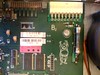
Click on the thumbnail to follow the link to bigger versions of the picture.
If you open up a cisco 3548 switch and take a look at the circuit board, there's a Buddha:
Click on the thumbnail to follow the link to bigger versions of the picture.
Wednesday, December 1, 2010
802.1x peeve
So, I'm trying to set up 802.1x, using MSFT's IAS server to do authentication against windows domain accounts. Seems straightforward enough.
I've set the switch up, which was pretty simple. The IAS server is being difficult, however. I've got it set to not send any extra VSA (vendor-specific attributes), but it's sending several along with the authentication approval that seem to make the switch choke. I've got a ticket open with MSFT about it.
It's not clear to me what's going on, here. I'll post again when I figure out more.
I've set the switch up, which was pretty simple. The IAS server is being difficult, however. I've got it set to not send any extra VSA (vendor-specific attributes), but it's sending several along with the authentication approval that seem to make the switch choke. I've got a ticket open with MSFT about it.
It's not clear to me what's going on, here. I'll post again when I figure out more.
Sunday, November 28, 2010
Cisco IOS CLI vs Foundry/Brocade CLI
The CLI for foundry and cisco devices are very similar. Some commands are identical:
show interface
show run
enable
Others are slightly different:
Some are notably different, such as putting a given port into a given VLAN (natively, not with 802.1q tagging or anything):
cisco:
show interface
show run
enable
Others are slightly different:
cisco             foundry
-------------     ----------------
show ip int br    show int br

description       port-name

speed 100
duplex full       speed-duplex 100-full
Some are notably different, such as putting a given port into a given VLAN (natively, not with 802.1q tagging or anything):
cisco:
vlan 100
int Fa 0/15
switchport mode access
switchport access vlan 100
foundry:
vlan 100 name MySpecialVLAN by port
untagged eth 15
Wednesday, November 17, 2010
more than a thousand times better than the nexus 6! take that, roy batty.
Cisco's hot new multiservices platform is the Nexus 7000. I haven't actually laid hands on one, but I figured I'd read up on them a bit. Thus, I blog about it.
It's a move away from IOS-based platforms -- it runs a newfangled "NX-OS". It's a big-assed chassis switch that runs either 10 or 18 modules; each of those configurations takes two supervisor modules, like the old supervisor cards on the Catalyst switches. The bigger chassis can take up to 516 gigabit ethernet connections which is some pretty beefy port density, right there.
The OS, NX-OS, has a similar CLI as IOS to keep with the cisco look and feel, but it is apparently a completely different beast than IOS under the hood: it's built on an embedded Linux kernel. (Historical trivia: IOS is somewhat derived from TENEX, the nonstandard OS for the PDP-10.) Wikipedia tells me that NX-OS doesn't support per-user logins or scp, that it considers all access-lists as extended (about time -- I think IOS's way of handling acl's dates back to when people were running multiprotocol networks that handled more than just IP), and that it doesn't support the 'write' command and instead uses the 'copy' command, which I can live with. It's derived from SAN-OS, which I am also unfamiliar with.
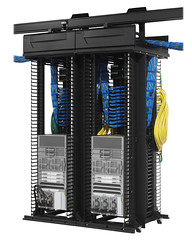
I believe the technical term for this device is "ginormous". The small one, which has 10 horizontal cards, is about half a rack high:
And for scale, here's another one of the 10 slot models next to its 18 slot (arranged horizontally) big sister:
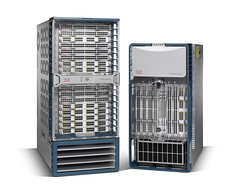
Looking at it, I'd say that even with the cards and power supplies and fans stripped out, you still need a 19" wide lift that can slide inside your cabinet to install it.
It's a move away from IOS-based platforms -- it runs a newfangled "NX-OS". It's a big-assed chassis switch that runs either 10 or 18 modules; each of those configurations takes two supervisor modules, like the old supervisor cards on the Catalyst switches. The bigger chassis can take up to 516 gigabit ethernet connections which is some pretty beefy port density, right there.
The OS, NX-OS, has a similar CLI as IOS to keep with the cisco look and feel, but it is apparently a completely different beast than IOS under the hood: it's built on an embedded Linux kernel. (Historical trivia: IOS is somewhat derived from TENEX, the nonstandard OS for the PDP-10.) Wikipedia tells me that NX-OS doesn't support per-user logins or scp, that it considers all access-lists as extended (about time -- I think IOS's way of handling acl's dates back to when people were running multiprotocol networks that handled more than just IP), and that it doesn't support the 'write' command and instead uses the 'copy' command, which I can live with. It's derived from SAN-OS, which I am also unfamiliar with.
I believe the technical term for this device is "ginormous". The small one, which has 10 horizontal cards, is about half a rack high:
And for scale, here's another one of the 10 slot models next to its 18 slot (arranged horizontally) big sister:
Looking at it, I'd say that even with the cards and power supplies and fans stripped out, you still need a 19" wide lift that can slide inside your cabinet to install it.
Wednesday, November 10, 2010
Cisco PIX/ASA order of operations for NAT
From this page on cisco.com:
inside-to-outside:
* If IPSec, then check input access list
* Decryption—for Cisco Encryption Technology (CET) or IPSec
* Check input access list
* Check input rate limits
* Input accounting
* Policy routing
* Routing
* Redirect to Web cache
* NAT inside to outside (local to global translation)
* Crypto (check map and mark for encryption)
* Check output access list
* Inspect context-based access control (CBAC)
* TCP intercept
* Encryption
outside-to-inside:
* If IPSec, then check input access list
* Decryption—for CET or IPSec
* Check input access list
* Check input rate limits
* Input accounting
* NAT outside to inside (global to local translation)
* Policy routing
* Routing
* Redirect to Web cache
* Crypto (check map and mark for encryption)
* Check output access list
* Inspect CBAC
* TCP intercept
* Encryption
inside-to-outside:
* If IPSec, then check input access list
* Decryption—for Cisco Encryption Technology (CET) or IPSec
* Check input access list
* Check input rate limits
* Input accounting
* Policy routing
* Routing
* Redirect to Web cache
* NAT inside to outside (local to global translation)
* Crypto (check map and mark for encryption)
* Check output access list
* Inspect context-based access control (CBAC)
* TCP intercept
* Encryption
outside-to-inside:
* If IPSec, then check input access list
* Decryption—for CET or IPSec
* Check input access list
* Check input rate limits
* Input accounting
* NAT outside to inside (global to local translation)
* Policy routing
* Routing
* Redirect to Web cache
* Crypto (check map and mark for encryption)
* Check output access list
* Inspect CBAC
* TCP intercept
* Encryption
Wednesday, October 20, 2010
More about BGP -- load sharing across equal-cost paths
Suppose you have several equal-bandwidth or equal-cost paths between a pair of routers that want to be BGP neighbors. For example, two or more WAN links between two BGP areas. You want the routers to route over both paths. The thing to do is to use a loopback address for your BGP neighbors. You must also have "ebgp-multihop" configured as well, so BGP will be okay with going to a neighbor that is not on the same subnet as itself.
So, router A (AS 64591) and router B (AS 64592) are connected by a pair of WAN links.
On router A:
int loopback 0
ip address 10.255.255.1 255.255.255.255
router bgp 64591
neighbor 10.254.254.1 remote-as 64592
neighbor 10.254.254.1 update-source loopback 0
neighbor 10.254.254.1 ebgp-multihop
Router B looks similar:
int loopback 0
ip address 10.254.254.1 255.255.255.255
router bgp 64592
neighbor 10.255.255.1 remote-as 64591
neighbor 10.255.255.1 update-source loopback 0
neighbor 10.255.255.1 ebgp-multihop
Don't forget to include your loopback network range in the "network" statement for the BGP instance.
So, router A (AS 64591) and router B (AS 64592) are connected by a pair of WAN links.
On router A:
int loopback 0
ip address 10.255.255.1 255.255.255.255
router bgp 64591
neighbor 10.254.254.1 remote-as 64592
neighbor 10.254.254.1 update-source loopback 0
neighbor 10.254.254.1 ebgp-multihop
Router B looks similar:
int loopback 0
ip address 10.254.254.1 255.255.255.255
router bgp 64592
neighbor 10.255.255.1 remote-as 64591
neighbor 10.255.255.1 update-source loopback 0
neighbor 10.255.255.1 ebgp-multihop
Don't forget to include your loopback network range in the "network" statement for the BGP instance.
Sunday, October 17, 2010
BGP basics: "Active" is not a good state.
BGP is TCP based. If you're got a router that wants to share BGP routes, each neighbor has to be explicitly configured. When this is done and BGP restarted, the router opens a BGP session to each of its neighbors on TCP/179 and chats about what routes it has and what routes it can learn.
If there are no routing updates, the routers exchange keep-alive packets every 60 seconds to be sure that the TCP session is still up and the routers are all happy.
When a BGP TCP session starts up, the BGP neighbor will show as state "Connect" when the router is actively trying to connect. If it successfully makes the connection, it shifts to state "OpenSent" and then through "OpenConfirm" to "Established".
If the router cannot make a successful TCP connection, it shifts to state "Active". NOTE: This does not mean that the connection has been made; just that it's actively trying to make the TCP connection. If your neighbors show as "Active", your routing is *not* working yet. Once the TCP session is established, the neighbor state goes through "OpenSent" and "OpenConfirm" to "Established". That last state, "Established" is the one you want to see in your summary of BGP neighbor states.
On a Cisco, your neighbor summary table would look something like this (taken from Cisco IOS IP Command Reference Vol 2 of 4: Routing Protocols, Release 12.3T - IP Routing Protocols Commands):
There are three fields that you're probably most interested in under normal circumstances:
This table (Table 41 in the same document) lists all the fields in the output and what they indicate.
If there are no routing updates, the routers exchange keep-alive packets every 60 seconds to be sure that the TCP session is still up and the routers are all happy.
When a BGP TCP session starts up, the BGP neighbor will show as state "Connect" when the router is actively trying to connect. If it successfully makes the connection, it shifts to state "OpenSent" and then through "OpenConfirm" to "Established".
If the router cannot make a successful TCP connection, it shifts to state "Active". NOTE: This does not mean that the connection has been made; just that it's actively trying to make the TCP connection. If your neighbors show as "Active", your routing is *not* working yet. Once the TCP session is established, the neighbor state goes through "OpenSent" and "OpenConfirm" to "Established". That last state, "Established" is the one you want to see in your summary of BGP neighbor states.
On a Cisco, your neighbor summary table would look something like this (taken from Cisco IOS IP Command Reference Vol 2 of 4: Routing Protocols, Release 12.3T - IP Routing Protocols Commands):
Router# show ip bgp summary


BGP router identifier 172.16.1.1, local AS number 100
BGP table version is 199, main routing table version 199
37 network entries using 2850 bytes of memory
59 path entries using 5713 bytes of memory
18 BGP path attribute entries using 936 bytes of memory
2 multipath network entries and 4 multipath paths
10 BGP AS-PATH entries using 240 bytes of memory
7 BGP community entries using 168 bytes of memory
0 BGP route-map cache entries using 0 bytes of memory
0 BGP filter-list cache entries using 0 bytes of memory
36 received paths for inbound soft reconfiguration
BGP using 34249 total bytes of memory
Dampening enabled. 4 history paths, 0 dampened paths
BGP activity 37/2849 prefixes, 60/1 paths, scan interval 15 secs

Neighbor        V    AS MsgRcvd MsgSent   TblVer  InQ OutQ Up/Down State/PfxRcd
10.100.1.1      4   200      26      22      199    0    0 00:14:23 23
10.200.1.1      4   300      21      51      199    0    0 00:13:40 0
There are three fields that you're probably most interested in under normal circumstances:
- The first one to look at is "State/PfxRcd": If the TCP session is up and the routers are exchanging routes, then this field will be a numeric value that shows how many route prefixes have been received from the remote neighbor.
- The next one of note is "TblVer", which is the routing table version. Under normal circumstances, this should be the same if routing is stable.
- The third field of interest is the "Up/Down". If the BGP session to the neighbor is up and happy in the "Established" state, this is the duration of the current TCP session. If it's not up and happy, this will display the current state of the connection. Remember, "Active" is not what you want to see here. (Yes, I'm harping on it, but I've seen many people make the mistake of thinking that "Active" means that the connection is working correctly.)
This table (Table 41 in the same document) lists all the fields in the output and what they indicate.
Sunday, October 10, 2010
Who's the boss? (OSPF edition)
So, a router interface that's participating in OSPF floods the network with a HELO packet -- this is sent to a multicast address, so if you've got acl's in play make sure they allow the OSPF multicast. One of the things the HELO traffic does, besides just announcing "hey, I'm here" to any likely devices that might also be looking for neighbors, is share out the information used for election of the "Designated Router" (DR) and "Backup Designated Router" (BDR).
The DR and BDR serve as points of contact for exchange of routing information -- instead of each router updated every other OSPF neighbor with link state announcements, all the devices update the DR and BDR and they send out link state updates to all of the OSPF neighbors. This reduces the complexity of the exchange of routing information.
DR and BDR election is done by OSPF priority. If two interfaces on a given network segment have the same priority, the higher Router ID is used as a tie-breaker. For any given OSPF device, the "Router ID" is the highest IP address on the box (including loopback interfaces). Specific router interfaces may have an OSPF priority set explicitly as well to adjust whether or not they become DR; a priority of 0 means that the interface should never be the DR or BDR; this is described as the state "DROTHER"
The DR and BDR serve as points of contact for exchange of routing information -- instead of each router updated every other OSPF neighbor with link state announcements, all the devices update the DR and BDR and they send out link state updates to all of the OSPF neighbors. This reduces the complexity of the exchange of routing information.
DR and BDR election is done by OSPF priority. If two interfaces on a given network segment have the same priority, the higher Router ID is used as a tie-breaker. For any given OSPF device, the "Router ID" is the highest IP address on the box (including loopback interfaces). Specific router interfaces may have an OSPF priority set explicitly as well to adjust whether or not they become DR; a priority of 0 means that the interface should never be the DR or BDR; this is described as the state "DROTHER"
Wednesday, September 22, 2010
Open Most Complicated Routing Protocol First
OSPF! Open Shortest Path First. It's an interior gateway routing protocol - you'd use OSPF within a given AS, for instance. It has a whole bunch of things that can be tweaked. Most people (in my experience) use it as their interior routing protocol.
OSPF is based around the idea of a link state diagram -- that is, a diagram of the network connections between all the routers in a given OSPF instance. When making routing decisions, a given router will figure out what the best ("shortest") next-hop is for a given destination. If left untweaked, the route metric will be based on the number of hops and the bandwidth of each link (lower-bandwidth links are less preferred). You can adjust that and manually weight routes to encourage traffic to go over a path that it would otherwise not prefer.
An OSPF-enabled router uses broadcast packets to announce itself and to find out about other OSPF routers in the same collision domain. If compatible, the routers will establish a neighbor relationship, and exchange route information. Among neighbors, there's a designated router and a designated backup router. The designated router is a given router interface that is in charge of sending out link state announcements and letting the other router interfaces know what's up with the links. It's a specific interface, not a specific individual router -- a router that is a DR on interface 1 might not be the DR for a separate OSPF instance on interface 2.
OSPF is based around the idea of a link state diagram -- that is, a diagram of the network connections between all the routers in a given OSPF instance. When making routing decisions, a given router will figure out what the best ("shortest") next-hop is for a given destination. If left untweaked, the route metric will be based on the number of hops and the bandwidth of each link (lower-bandwidth links are less preferred). You can adjust that and manually weight routes to encourage traffic to go over a path that it would otherwise not prefer.
An OSPF-enabled router uses broadcast packets to announce itself and to find out about other OSPF routers in the same collision domain. If compatible, the routers will establish a neighbor relationship, and exchange route information. Among neighbors, there's a designated router and a designated backup router. The designated router is a given router interface that is in charge of sending out link state announcements and letting the other router interfaces know what's up with the links. It's a specific interface, not a specific individual router -- a router that is a DR on interface 1 might not be the DR for a separate OSPF instance on interface 2.
Friday, April 16, 2010
"Wait, I thought you knew the password..."
"My voice is my passport. Verify me."
So, there you are, with a cisco 2800 series router that you need to reconfigure. And you're all set to take some down time, reconfigure it, and drop back into service.
Only you don't have the password for it. The password is lost, or forgotten, or was typo'd initially. Something like that. Which makes any further configuration tasks kind of difficult.
Password recovery on the cisco 2800 is pretty trivial. You don't even have to do a full wipe to factory defaults, so no configuration data is lost. You need to be able to power cycle the router, so you need to have either physical access or the ability to remotely control whatever outlet is feeding your router. If you've got that, then it just takes a console connection and about 10 minutes of downtime. Non-enable exec access to the unprivileged command line interface is helpful, but not required.
First, make sure you know how to send a "break" signal with whatever you're using to connect to the console - whether directly to the console from a serial port on your computer, or via some kind of remote console server.
Connect to your router's console port. If you've got the CLI access, run the command "sh ver | inc register". Your output should be something like:
Make a note of that octal number. If you don't have CLI access, just assume it's 0x2102, because that's almost certainly what it is.
This is the configuration register, which tells the router important things at boot time, like "Should I load IOS? Should I load the config that's in my NVRAM?" What you need to do is tell it that, in fact, it should not load the NVRAM config on boot. This is done by modifying the config register. To do that, you need to get into "rommon" mode.
Power cycle your router, and then send the "break" sequence within the first 60 seconds of power-on.
It should display a message "System received an abort due to break key", and then a bit more text, and then the "rommon 1>" prompt. If it starts to self-decompress its IOS image, you've missed your opportunity and you'll need to power cycle the router and try sending the break sequence again.
Change the value for the configuration register with the command
Reset the router with the "reset" command. At this point, the router should go through it's normal boot sequence, decompressing the IOS image and starting up IOS. But since it's not loading the configuration from NVRAM, it will ask you if you want to go through the initial configuration dialog, just as if it were a new router out of the box. You don't want the guided setup, so you can answer "n" to the question:
Hit return a few times to get to the "Router>" prompt, and then go into enable mode -- you will not be prompted for a password -- and then tell the router to load the "startup-config" configuration from NVRAM into running memory.
You should then see messages about interfaces coming up and other normal messages as the router processes your config information. Once it's done with that, you should have a prompt for the configured hostname of your router. At this point, you can change the passwords and enable secrets as normal, enable your live interfaces, and then save the config to NVRAM to save your changes.
Take a look at the configuration, and the interfaces, and verify that the router looks like you want it to -- that interfaces are up and happy. You don't want to be accidentally saving a config that has all your interfaces in "shutdown" mode. Since "no shut" is the default state, the config you loaded won't include the "no shut" commands explicitly. So make sure all your active interfaces are up.
Now, you need to reset the configuration register to the previous value so that the next time the router reboots, it will read the NVRAM config.
Do a "sh ver" to make sure the configuration register reads "0x2102". If you have the spare time in your downtime window and you want to be extra sure, do a clean reload on the router and make sure it comes up happily. Because nothing sucks like being locked out of a router because of something you did in an attempt to not be locked out of a router.
So, there you are, with a cisco 2800 series router that you need to reconfigure. And you're all set to take some down time, reconfigure it, and drop back into service.
Only you don't have the password for it. The password is lost, or forgotten, or was typo'd initially. Something like that. Which makes any further configuration tasks kind of difficult.
Password recovery on the cisco 2800 is pretty trivial. You don't even have to do a full wipe to factory defaults, so no configuration data is lost. You need to be able to power cycle the router, so you need to have either physical access or the ability to remotely control whatever outlet is feeding your router. If you've got that, then it just takes a console connection and about 10 minutes of downtime. Non-enable exec access to the unprivileged command line interface is helpful, but not required.
First, make sure you know how to send a "break" signal with whatever you're using to connect to the console - whether directly to the console from a serial port on your computer, or via some kind of remote console server.
Connect to your router's console port. If you've got the CLI access, run the command "sh ver | inc register". Your output should be something like:
Configuration register is 0x2102
Make a note of that octal number. If you don't have CLI access, just assume it's 0x2102, because that's almost certainly what it is.
This is the configuration register, which tells the router important things at boot time, like "Should I load IOS? Should I load the config that's in my NVRAM?" What you need to do is tell it that, in fact, it should not load the NVRAM config on boot. This is done by modifying the config register. To do that, you need to get into "rommon" mode.
Power cycle your router, and then send the "break" sequence within the first 60 seconds of power-on.
It should display a message "System received an abort due to break key", and then a bit more text, and then the "rommon 1>" prompt. If it starts to self-decompress its IOS image, you've missed your opportunity and you'll need to power cycle the router and try sending the break sequence again.
Change the value for the configuration register with the command
confreg 0x2142
Reset the router with the "reset" command. At this point, the router should go through it's normal boot sequence, decompressing the IOS image and starting up IOS. But since it's not loading the configuration from NVRAM, it will ask you if you want to go through the initial configuration dialog, just as if it were a new router out of the box. You don't want the guided setup, so you can answer "n" to the question:
 --- System Configuration Dialog ---

Would you like to enter the initial configuration dialog? [yes/no]: n
Hit return a few times to get to the "Router>" prompt, and then go into enable mode -- you will not be prompted for a password -- and then tell the router to load the "startup-config" configuration from NVRAM into running memory.
Router>enable
Router#copy startup-config running-config
Destination filename [running-config]?
You should then see messages about interfaces coming up and other normal messages as the router processes your config information. Once it's done with that, you should have a prompt for the configured hostname of your router. At this point, you can change the passwords and enable secrets as normal, enable your live interfaces, and then save the config to NVRAM to save your changes.
MyPetRouter# conf t
Enter configuration commands, one per line. End with CNTL/Z.
MyPetRouter(config)# (stuff to bring your interfaces up)
MyPetRouter(config)#ena sec Y0ullNeverGuess
MyPetRouter(config)#line con 0
MyPetRouter(config)#pass ThisIsMyPW
MyPetRouter(config)#line vty 0 15
MyPetRouter(config)#pass ThisIsMyPW
MyPetRouter(config)#^Z
09:22:00: %SYS-5-CONFIG_I: Configured from console by console
MyPetRouter#wr t
Building configuration...
[OK]
Take a look at the configuration, and the interfaces, and verify that the router looks like you want it to -- that interfaces are up and happy. You don't want to be accidentally saving a config that has all your interfaces in "shutdown" mode. Since "no shut" is the default state, the config you loaded won't include the "no shut" commands explicitly. So make sure all your active interfaces are up.
Now, you need to reset the configuration register to the previous value so that the next time the router reboots, it will read the NVRAM config.
MyPetRouter(config)#config-register 0x2102
MyPetRouter(config)#^Z
09:29:00: %SYS-5-CONFIG_I: Configured from console by console
MyPetRouter#
Do a "sh ver" to make sure the configuration register reads "0x2102". If you have the spare time in your downtime window and you want to be extra sure, do a clean reload on the router and make sure it comes up happily. Because nothing sucks like being locked out of a router because of something you did in an attempt to not be locked out of a router.
Subscribe to:
Posts (Atom)
About Me

- regis
- Regis has worked as a network engineer since 1994 for small companies and for large companies.
